Instant Access
Sign in from any browser or the Bitkingz PWA shortcut without downloading an app from Google Play or the App Store.
Login at Bitkingz in Canada: Mobile Account Access
Access 16,000+ games and your full account in seconds from any device.
Keep Your Account Secure
What You Should Do
What You Should Avoid
Your Login, Your Way
Instant Access
Sign in from any browser or the Bitkingz PWA shortcut without downloading an app from Google Play or the App Store.
Two-Factor Authentication
Enable 2FA in your account settings to add a second verification step every time you sign in.
Mobile Login
The full Bitkingz platform loads in any mobile browser on Android and iOS, with the same games and cashier available as on desktop.
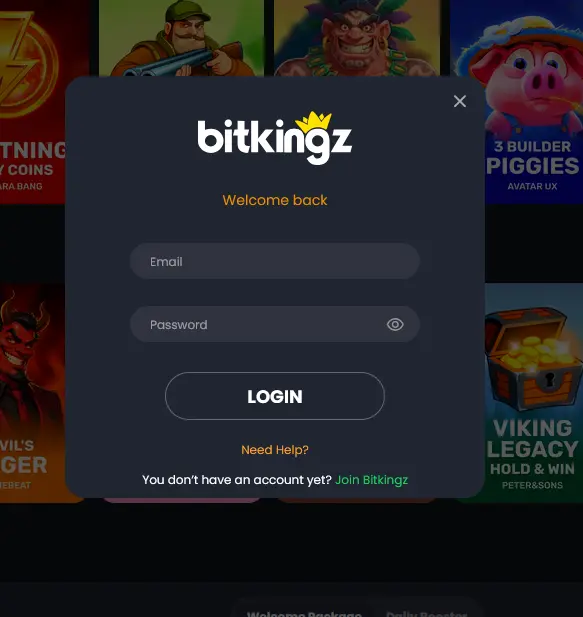
Signing in to your Bitkingz account takes a few seconds regardless of the device you are using. The platform runs directly in the browser, so there is no software to install before you start.
Open bitkingz24.com in any modern desktop browser. Click the Sign In button in the top-right corner of the homepage. Enter the email address and password you used when registering. Click the Login button. If two-factor authentication is enabled on your account, you will be prompted to enter the verification code from your authenticator app before gaining access. Once confirmed, you land directly in the lobby where the full catalogue of 16,000+ games and your cashier are immediately available.
Visit bitkingz24.com from your phone’s browser on either Android or iOS. The site adapts to portrait orientation automatically. Tap Sign In at the top of the screen, enter your credentials, and confirm your 2FA code if you have it enabled. All games from Pragmatic Play, Evolution Gaming, NetEnt, and the rest of the Bitkingz provider lineup load in the mobile browser without any plugin requirements.
Bitkingz does not have a native application in the Google Play Store or the Apple App Store. Instead, a PWA (Progressive Web App) shortcut can be added to your phone’s home screen directly from the casino website. Once installed, tapping the Bitkingz icon opens the platform in a full-screen view that functions like a native app. Logging in through the PWA works identically to logging in via the browser.
Bitkingz uses standard email-and-password authentication. There is no social login through Google, Facebook, or Apple. When you registered, you chose an email address and set a password; those same credentials are what you enter each time you sign in. Two-factor authentication is optional but recommended, and it can be activated in the security section of your account profile. Once 2FA is on, you need both your password and a time-based one-time code to complete the login, which effectively prevents unauthorized access even if someone obtains your password.
The Bitkingz platform applies SSL encryption to all connections between your device and the server, meaning your credentials travel in an encrypted form that cannot be read in transit. 2FA is available as an additional layer on top of that connection-level protection and is the single most effective step you can take to prevent unauthorized access to your account. All Bitkingz accounts are also subject to Know Your Customer verification prior to processing large withdrawals; completing KYC early, by submitting a copy of your Canadian driver’s licence, passport, or provincial photo ID card plus a recent utility bill or bank statement, ensures that withdrawal requests are not delayed when you are ready to cash out.
Several issues can prevent a successful login, and most are resolved quickly.
A forgotten password is the most common reason. Use the Forgot Password link on the login screen to receive a reset link at your registered email address. If the reset email does not arrive, check your spam folder or contact [email protected].
If your email address is not recognized, you may have registered under a different address or may not have completed the registration process. Check any confirmation email you received from Bitkingz when you signed up; it will confirm the exact email address on the account.
If you see an error message stating that your account has been suspended, contact the Bitkingz support team via live chat. Suspensions are typically triggered by a security flag or a pending KYC review and can often be resolved within the same session.
Players outside Canada sometimes experience geo-restricted access. Connecting through a VPN may trigger security checks. If you encounter a block, contact support through the live chat widget, which remains accessible from the login page.
Creating a Bitkingz account is free and takes under two minutes. Visit the registration page on bitkingz24.com, enter your email address and a strong password, select CAD as your account currency, and confirm your email. Once registered, you can make your first deposit using Interac, iDebit, Instadebit, Visa, Mastercard, or any of the other supported methods and apply bonus code BK1 to claim the first part of the $3,000 welcome package. Minimum age to register is 19 (18 in Alberta, Manitoba, and Quebec).
Login Questions
Click the Forgot Password link on the login page, enter the email address registered to your account, and follow the reset instructions sent to that address. If the email does not arrive within a few minutes, check your spam folder or contact support at [email protected].
Bitkingz locks accounts temporarily after multiple failed password attempts as a fraud-prevention measure. Wait a short period and try again, or contact live chat support to have the lock reviewed.
Yes. The Bitkingz platform runs fully in mobile browsers on both Android and iOS. You can also add a PWA shortcut to your home screen from the casino website for one-tap access without visiting the App Store or Google Play.
No. Bitkingz permits one account per person. Operating multiple accounts violates the Terms and Conditions and may result in suspension of all associated accounts and forfeiture of any bonus funds.
Ready to Play? Sign In Now
Grab 100% up to $3,000 and 225 free spins.
Enter Casino Play responsibly. Minimum age 19 (18 in Alberta, Manitoba and Quebec). Bonus terms and wagering conditions apply.