Full Catalogue on Mobile
All 16,000+ games from Pragmatic Play, Evolution Gaming, NetEnt, and other providers load in the mobile browser without any app store download.
App at Bitkingz in Canada: No Download Needed
Install the Bitkingz PWA shortcut on Android or iOS and access 16,000+ games, Interac banking, and your full account from anywhere in Canada.
Install the Bitkingz PWA shortcut on Android or iOS and access 16,000+ games, Interac banking, and your full account from anywhere in Canada.
Install the Bitkingz PWA shortcut on Android or iOS and access 16,000+ games, Interac banking, and your full account from anywhere in Canada.
Launch on Mobile Play responsibly. Minimum age 19 (18 in Alberta, Manitoba and Quebec). Bonus terms and wagering conditions apply.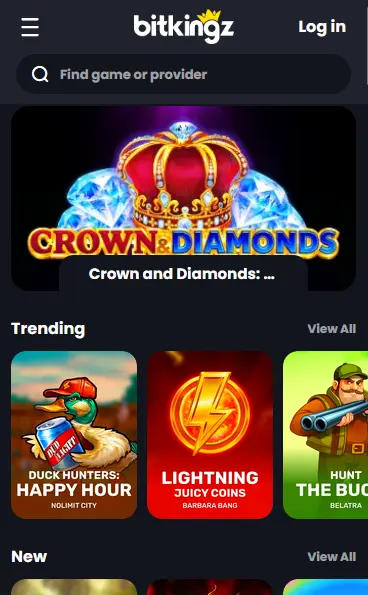
How to Install the Bitkingz App
Why Play on Mobile
Full Catalogue on Mobile
All 16,000+ games from Pragmatic Play, Evolution Gaming, NetEnt, and other providers load in the mobile browser without any app store download.
Fast Load Times
The SoftSwiss platform and HTML5 game delivery ensure quick load times on any modern Android or iOS device with a stable connection.
Secure Mobile Sessions
SSL encryption, 2FA, and biometric login support protect every session, whether you play through the browser or the home-screen PWA shortcut.
Bitkingz Mobile: Quick Look
Pros
Cons
Mobile Security
What You Should Do
What You Should Avoid
Device Requirements
Android
iOS
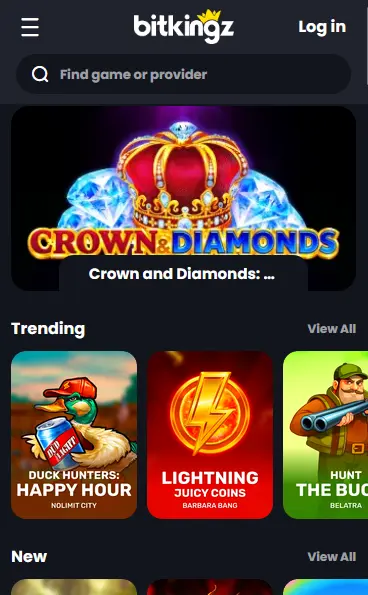
The Bitkingz mobile experience delivers the full desktop catalogue through a browser-based platform that requires no app store installation. Because every game in the Bitkingz library is built in HTML5, titles from Pragmatic Play, NetEnt, Evolution Gaming, Playtech, Yggdrasil Gaming, and the other 80+ providers load and play directly in the mobile browser without additional software.
The mobile platform offers the same feature depth as the desktop site: the complete game lobby covering 16,000+ titles, the full cashier with Interac, iDebit, Instadebit, and cryptocurrency support, the promotions section including the Tuesday Melee, Friday Raid, and Sunday Feast reloads, and the VIP program dashboard where Kingz Points balances and tier progress are visible. Live chat support is accessible from within the mobile interface at all times.
The PWA shortcut adds a persistent home-screen icon and removes the browser’s address bar for a cleaner, app-like display. Beyond that visual difference, the feature set is identical to the standard browser experience. Certain high-volatility slots from ELK Studios and Thunderkick display better in landscape orientation, so rotating your device on those titles may improve the visual experience. Push notifications are browser-based rather than native OS notifications.
The Bitkingz PWA runs on any modern smartphone or tablet running a supported operating system. There is no download file measured in gigabytes; the PWA shortcut takes approximately 5 MB of storage and the rest loads from the server each session.
Android 8.0 (Oreo) or later is required. Chrome version 90 or above is the recommended browser for installing the PWA on Android. Players on Android 10 and later will find that Chrome prompts an Add to Home Screen banner automatically when visiting the casino site; this banner can also be triggered manually through the browser menu.
iOS 13.0 or later is required. Safari is the only browser on iOS that supports PWA installation to the home screen; Chrome and other third-party iOS browsers can browse the casino but cannot install the shortcut. Players on iOS 16.4 or later benefit from improved PWA support including web push notification capability.
| Feature | Android | iOS |
|---|---|---|
| Minimum OS | Android 8.0 | iOS 13.0 |
| Recommended browser | Chrome 90+ | Safari 14+ |
| Internet connection | 4G LTE or Wi-Fi | 4G LTE or Wi-Fi |
| Storage for PWA | ~5 MB | ~5 MB |
| App Store required | No | No |
Installing the Bitkingz PWA takes about a minute on either platform and uses only the mobile browser you already have on your phone.
Open Chrome on your Android device and navigate to bitkingz24.com. After the page loads, tap the three-dot menu icon in the upper-right corner of Chrome. Select Add to Home Screen from the dropdown menu. A dialogue box will appear allowing you to name the shortcut; the default name Bitkingz is fine. Tap Add. The Bitkingz icon will appear on your home screen. From that point, tapping the icon launches the casino in a full-screen view that behaves like a dedicated application.
Open Safari on your iPhone or iPad and navigate to bitkingz24.com. Tap the Share button at the bottom of the screen (the icon that looks like a box with an upward arrow). Scroll down the share sheet and tap Add to Home Screen. A name field will appear pre-filled with Bitkingz; tap Add in the upper-right corner to confirm. The shortcut appears on your home screen. Tapping it opens the casino in a full-screen, chrome-free view.
If no prompt appears automatically when visiting bitkingz24.com, the manual installation process described above for Android and iOS works on all compatible devices. The casino also displays a download link in the bottom-left corner of the homepage that triggers the same PWA installation flow.
Every game category available on the desktop site is accessible through the Bitkingz PWA and mobile browser, with no titles restricted to desktop only.
The 14,000+ slot catalogue includes all titles from Pragmatic Play (Gates of Olympus, Sweet Bonanza), NetEnt (Starburst, RTP 96.1%), Thunderkick (Midas Golden Touch, RTP 96.1%), BGaming (Elvis Frog Trueways, RTP 97%), Relax Gaming (Money Train 4), ELK Studios, Play’n GO, Yggdrasil Gaming, and the rest of the provider lineup. Megaways titles, bonus-buy slots, and crypto-themed games all load cleanly on mobile.
All 500+ live dealer tables stream in HD on mobile. Evolution Gaming’s Instant Roulette and Mega Wheel, Pragmatic Play Live tables, and Bombay Live blackjack sessions all adapt to portrait orientation on a phone screen. The in-game chat function and multi-table view are available where supported by the provider.
Classic and variant blackjack, roulette, and baccarat titles from Microgaming Quickfire, Habanero, and Playtech are accessible in the mobile lobby. The search bar makes it easy to find a specific variant such as Atlantic City Blackjack or Gold Roulette by name.
The 2,300+ progressive jackpot slots, including Absolootly Mad: Mega Moolah and Wheel of Wishes by Microgaming Quickfire, and Age of the Gods: Prince of Olympus by Playtech, are fully playable in the mobile browser. Jackpot values update in real time.
The Bitkingz cashier is fully functional through the mobile browser and PWA, with the same methods and limits as the desktop cashier.
Interac, iDebit, Instadebit, Visa, Mastercard, Maestro, Skrill, Neteller, MuchBetter, Paysafecard, Jeton, MiFinity, Neosurf, and cryptocurrency options including Bitcoin, Ethereum, Litecoin, Dogecoin, and Tether are all accessible in the mobile cashier. CAD is the account currency and no conversion takes place for deposits in Canadian dollars.
| Method | Deposit Speed | Withdrawal Speed |
|---|---|---|
| Interac | Instant | Up to 24 hours |
| iDebit / Instadebit | Instant | Up to 24 hours |
| Visa / Mastercard | Instant | 3-5 business days |
| Skrill / Neteller | Instant | Up to 24 hours |
| Bitcoin / Ethereum | Minutes | Minutes to hours |
| Paysafecard | Instant | Deposit only |
All mobile cashier transactions use SSL encryption. Crypto transactions are processed by CoinsPaid, a regulated and audited payment processor. Withdrawals are returned to the same method used for the deposit.
SSL encryption is applied to every connection between your mobile device and the Bitkingz platform. This protects your login credentials, payment details, and session data from interception regardless of whether you are on a home network or mobile data.
Two-factor authentication can be activated in the account security settings. Once enabled, each login requires both your password and a time-sensitive code from your authenticator app. This applies equally to logins via mobile browser and the PWA shortcut.
Many Android and iOS devices allow biometric authentication (fingerprint or Face ID) to autofill saved passwords in the browser. While Bitkingz does not operate its own biometric system, players can use their device’s built-in password manager with biometric unlock to make mobile login faster and more secure.
New players can complete the full Bitkingz registration process on mobile in under two minutes. Open bitkingz24.com on your phone, tap the Join or Register button, fill in your email address and password, select CAD as your currency, and confirm your email via the link sent to your inbox. The minimum age to register is 19 years old (18 in Alberta, Manitoba, and Quebec).
Returning players tap Sign In on the mobile homepage, enter their email and password, and complete 2FA verification if it is enabled. The full sign-in guide and troubleshooting steps are available on the login page for players who encounter issues with forgotten passwords, locked accounts, or browser-specific problems.
Every promotion available on the desktop platform is equally accessible through the Bitkingz mobile browser and PWA. Players aged 19 or older (18 or older in Alberta, Manitoba, and Quebec) can claim the full welcome package of up to $3,000 CAD plus 225 free spins on Pragmatic Play slots by entering codes BK1, BK2, and BK3 at the mobile cashier. The Tuesday Melee, Friday Raid, Sunday Feast, and Wednesday live casino cashback promotions are all redeemable on mobile. The VIP program dashboard and Crypto Quest loyalty map are accessible in the account section of the mobile interface. For the complete list of bonus terms, wagering requirements, and eligible games, visit the Bitkingz bonus page.
Live chat is accessible through the mobile browser and PWA by tapping the chat icon. Email support is available at [email protected]. The Bitkingz support team is on duty 24 hours a day, 7 days a week, covering Pacific, Mountain, Central, Eastern, Atlantic, and Newfoundland Time. There is no telephone support line.
Bitkingz provides deposit limits, loss limits, wager limits, and self-exclusion tools accessible through the account settings on mobile. Players wishing to set a self-exclusion period can initiate the process through the live chat team or by emailing [email protected]. Responsible gambling tools apply equally to mobile and desktop sessions.
App Questions
No. Bitkingz does not have a native application in Google Play or the Apple App Store. The casino offers a PWA (Progressive Web App) that you install directly from bitkingz24.com, which works like a native app on both Android and iOS without going through an app store.
Android 8.0 (Oreo) or later with Chrome 90 or above is recommended. Most Android devices released in the last five or six years meet this requirement.
Yes. The full Bitkingz cashier, including Interac, iDebit, Instadebit, Visa, Mastercard, and cryptocurrency options, is available through the PWA and the mobile browser.
Yes. All games from Pragmatic Play, Evolution Gaming, NetEnt, and the rest of the Bitkingz provider lineup are built in HTML5 and load natively in the mobile browser and PWA without any plugin.
Install Bitkingz on Your Phone Today
Grab 100% up to $3,000 and 225 free spins.
Enter Casino Play responsibly. Minimum age 19 (18 in Alberta, Manitoba and Quebec). Bonus terms and wagering conditions apply.